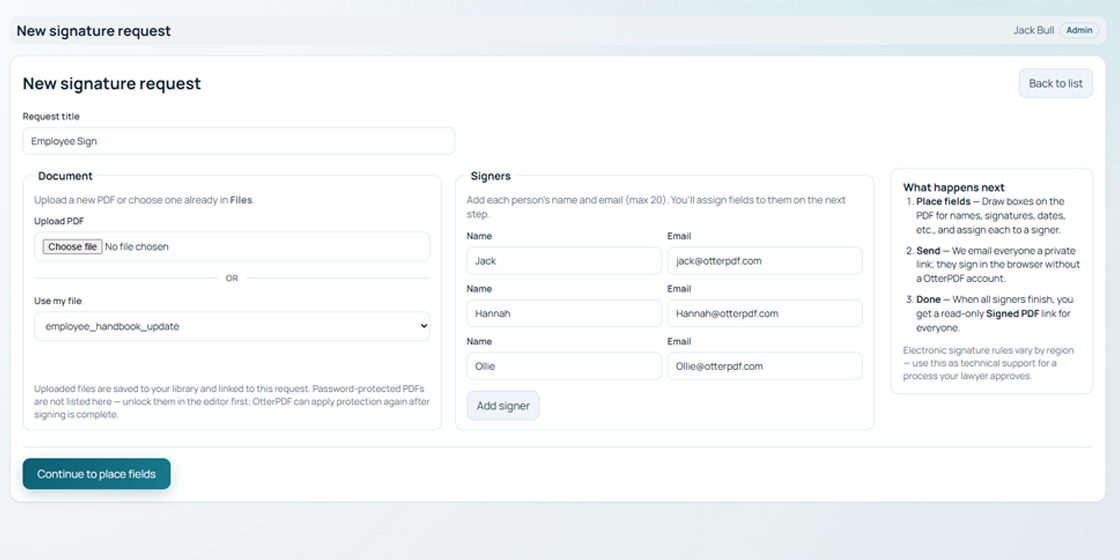
1) Set up request
Choose your PDF, add signer names/emails, and define the request title.
Send one document to one or many signers, track progress, and receive a finished copy when everyone is done.
Request Sign is OtterPDF's multi-party signing workflow for PDFs in your account. You upload or pick a file, place signer fields, and email private links. Signers open in the browser and complete only their assigned fields. No app install and no signer account required.
Choose your PDF, add signer names/emails, and define the request title.
Drop Name, Initial, DOB, date/time, and signature fields on the PDF and assign each field to a signer.
Each signer gets their own private URL by email. They sign in-browser with no OtterPDF account required.
Monitor status from the prepare page and resend reminders to anyone still pending.
After all signers finish, OtterPDF generates a flattened signed PDF and applies edit-protection before delivery.
Owner and signers receive a read-only link to view, print, or download the completed document.
Collect signatures in one coordinated flow instead of chasing email attachments and scans.
Signers only see what they need to fill, reducing confusion and mistakes.
Customers, vendors, and partners can sign from the link without creating an account.
See who has signed, who is pending, and resend to non-completed recipients.
When a request reaches 100% completion, the signed PDF is generated first, then passed through a protection step that locks edit permissions. This helps prevent post-signing changes or tampering to the completed copy.
Legal note: electronic signature requirements vary by jurisdiction (for example eIDAS, ESIGN/UETA). Request Sign provides technical workflow tools; confirm legal and compliance requirements for your use case.
Use your own PDF and test the full workflow in minutes.